Klout logoI’ve recently succumbed to peer pressure and registered myself in the vanity game called Klout.
What it does is basically tell you how “influential” you are across several different social networking channels (mainly Twitter and Facebook) and how far your “reach” is.

I have to admit, it is kind of fun to see your own scores progress over the weeks. I couldn’t say if this is actually a deterministic way to tell if somebody is a person you should listen to (at least for the topics he’s listed as influencer on Klout), or if this is just another way beyond follower-/friends-counts to stroke ones ego, but it provides some nice insights about the topics you converse about online.

Klout features two more interesting things I’d like to point out:

  • Topics: Pages about different topics, who talks about them and who are the top influencers in that field.
  • Perks: Depending on your score, you can get gifts or discounts from numerous companies around the world. Now that’s what I call motivation to communicate online 🙂
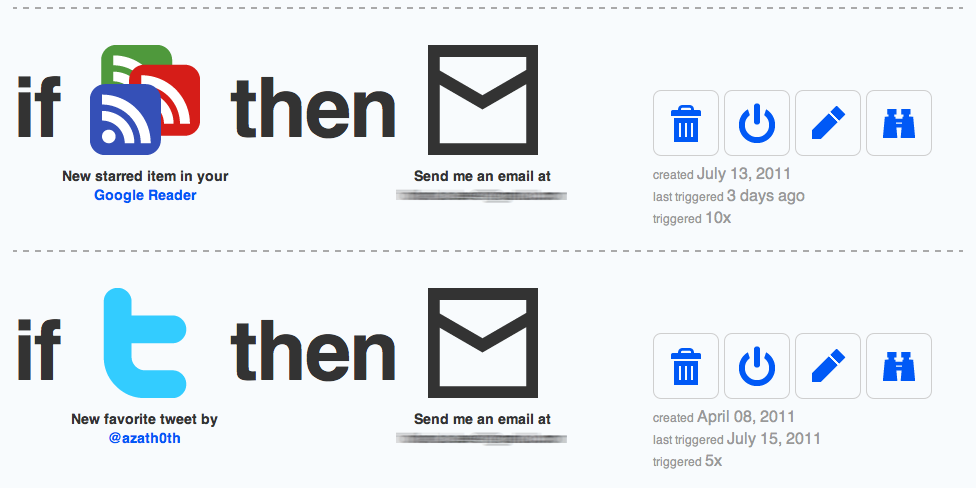
Click here to see the ifttt tasks

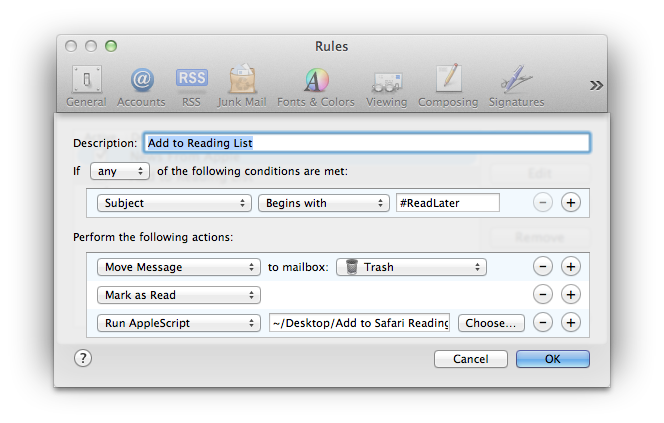
Click here to see the Mail Rule

This is kind of a stripped down version of Read It Later or Instapaper, but functions perfectly for my workflow.

Requirements

  • Apple Mail
  • Apple Safari (with Reading List Support)
  • ifttt Account

First I’ve set up actions in ifttt that forward Links I favorite in Twitter or Google Reader, to my personal Email and prepend the subject with “#ReadLater”. Next I constructed a Mail Rule that acts on all messages who’s subjects begin with said keyword. The Mail Rule will invoke the following Applescript, mark the message as read and move it to the trash.

using terms from application "Mail"
	on perform mail action with messages theSelectedMessages
		tell application "Mail"
			repeat with eachMessage in theSelectedMessages
				set mailbody to content of eachMessage
				set theUrl to paragraph 1 of mailbody
				tell application "Safari"
					add reading list item theUrl
				end tell
			end repeat
		end tell
	end perform mail action with messages
end using terms from

Use cases

  • Read newsfeeds on iPhone. Save longer or interesting articles for later by clicking the favorite star.
  • Interesting item pops up on twitter, but you don’t have time now to read the containing link right now.
  •  While walking in the street you see a URL you want to remember, just mail it to yourself with the appropriate keyword in the subject.

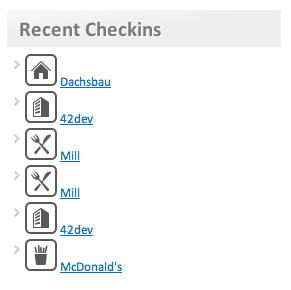
Foursquare Latest Checkins Widget Screenshot

Foursquare Latest Checkins Widget

I just released the first public version of my newest WordPress Plugin.

The Widget displays your latest Foursquare checkins in your sidebar. There are quite a few plugins out there that offer similar or even more features, but my motivation was, that I wanted the venue icons to show up as well. After a bit of research I found out, that the only way would be to use Foursquare’s API and not the private RSS feed most of the other developer used for easy integration.

Since I didn’t want to learn yet another API I just used Yahoo’s awesome YQL to get out the data I wanted. There is no caching impemented in the plugin at the moment, so it would be wise (anyway) to have some kind of page caching mechanism installed on your WordPress blog, otherwise it might slow down page loads, because of the sometimes relatively high latency of YQL calls.

Head over to the Foursquare Latest Checkins Plugin page to download.

Feel free to comment with feature requests, questions and criticism. I’ll try to answer it all!

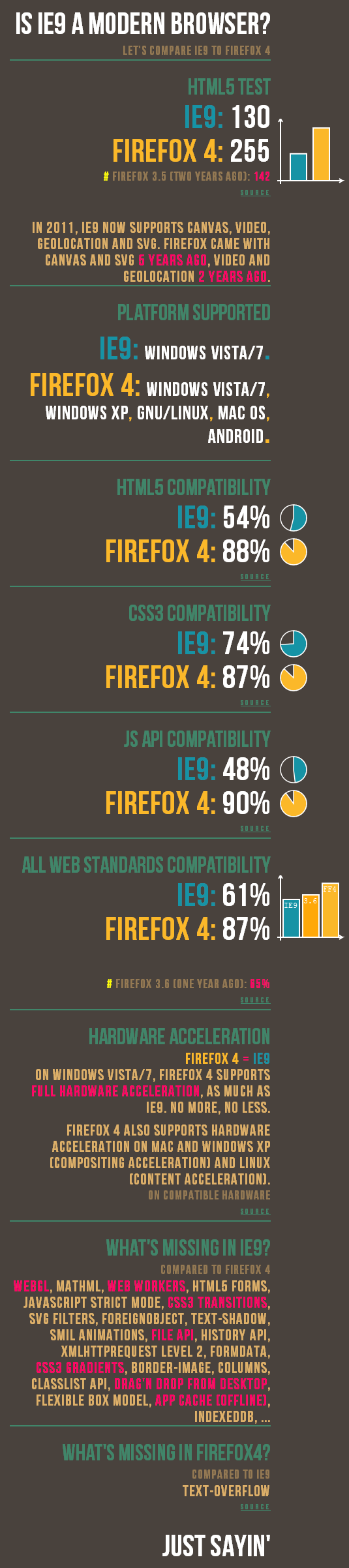
Firefox versus IE9I just stumbled upon this infographic by @paulrouget that explains the differences between Mozilla Firefox (4) and the just released Microsoft Internet Explorer 9. I have to say, that I was pretty excited about this new IE version, because I thought that maybe finally the headaches over IE compatibility will start to fade away. But after reading through all those information I am very disappointed. For instance they still didn’t implement simple CSS stuff like text-shadow? Seriously?! (And I’m not even talking about transitions, gradients or HTML5 history API)

Click here to see the graphic as an HTML document with clickable links to all the test sources.

When will Microsoft wake up and get their act together? Is there really any incentive in releasing a browser that lacks so far behind? Especially when they already acknowledged that their older products (IE7 & IE8) are lacking most of the modern web technologies and thus they needed to release IE9.


Thanks to @malde for sharing this in Google Reader!