You can build a feed that contains the exact stories you are interested in from Digg.com. You can filter by: description, category, submitters, number of diggs, and number of comments.

DiggFiltr.com is a very neat page. Still under heavy development but the core feature is very useful already. I instantly created my own filtered Digg.com feed by applying a few filters on the sections I’m interested in. I can see this site getting really popular if the developer goes in the right direction with it.

One thing that I also liked was that, according to the developers blog, it only took him about 10 days to learn Ruby on Rails and develop this application which uses AJAX very extensively. Sounds like Ruby on Rails is really a good choice for rapid web development. Maybe I should kick myself into learning it finally (…if I only had time!).


Logo
I stumbled upon a very funny link while browsing through all the referrer links for my blog.
Apparently someone was browsing my blog from work without wanting anybody to notice it. This person used workFRIENDLY which is a hilarious website that tries to mimic Microsoft Office and displays the page you opened as text in this window.

I’m sure the interface looks much better in Internet Explorer which also has a fullscreen feature that could come in handy with work FRIENDLY. I only browse with Apple’s Safari, that’s why I can’t test that. The site even features a small HTML snippet which you can insert into your own page. This snippet calls a JavaScript which then offers a button on your page to immediately “make it work friendly”.

Picture 1-4I found a blog that has a kind of interesting idea of how to drive more traffic to it and gain some attention on the internet.

The author of the site called SHO()OT MY BLOG! wants everybody to load his blog on the screen, then take a photo with a digital camera and send it to his eMail address. The photo should be funny or creative in any way.

I think it’s a quite interesting idea and I can easily imagine that he will get quite famous with it. At the time of this writing there were 46 photos already posted. Not bad, considering that the blog started only a few weeks ago.

I haven’t decided yet, but I may be taking part in the sites contest if I have a good idea.

Small
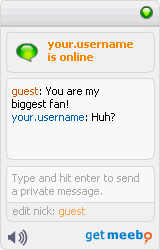
The popular online Instant Messaging site Meebo launched a new service.

With meebo me you can easily embed a widget on you blog oder website, allowing visitors to instantly chat with you.

I think this service is great as it makes communicating with your sites visitors very easy and very instantaneous.
The only downside is that I have to be logged in on the Meebo site to use the service. Think of the advantage if they would offer a chat protocol that I can connect to with my Adium client to see people visiting my blog and talk to them. I can’t really imagine wanting to have the Meebo website open all the time.

Anyway… the idea of meebo me is awesome and very innovative.

Great! Yesterday I took the time to finally update my WordPress install to 2.0.3 and also update all my used plugins to their newest versions. It took me very long since I changed a fair bit of code in the original WordPress install and in addition the FAlbum plugin seemed to behave strangely.

And now today I get notified via RSS that WordPress 2.0.4 is out and all users are recommended to update (as always) because it contains several security fixes (again).

Ok, it’s too late today I’ll probably update tomorrow.

When will WordPress include some kind of web-accessible function for upgrading instead of the cumbersome file based way?